Dental CBCT in the cloud: day-to-day storage and sharing in clinic
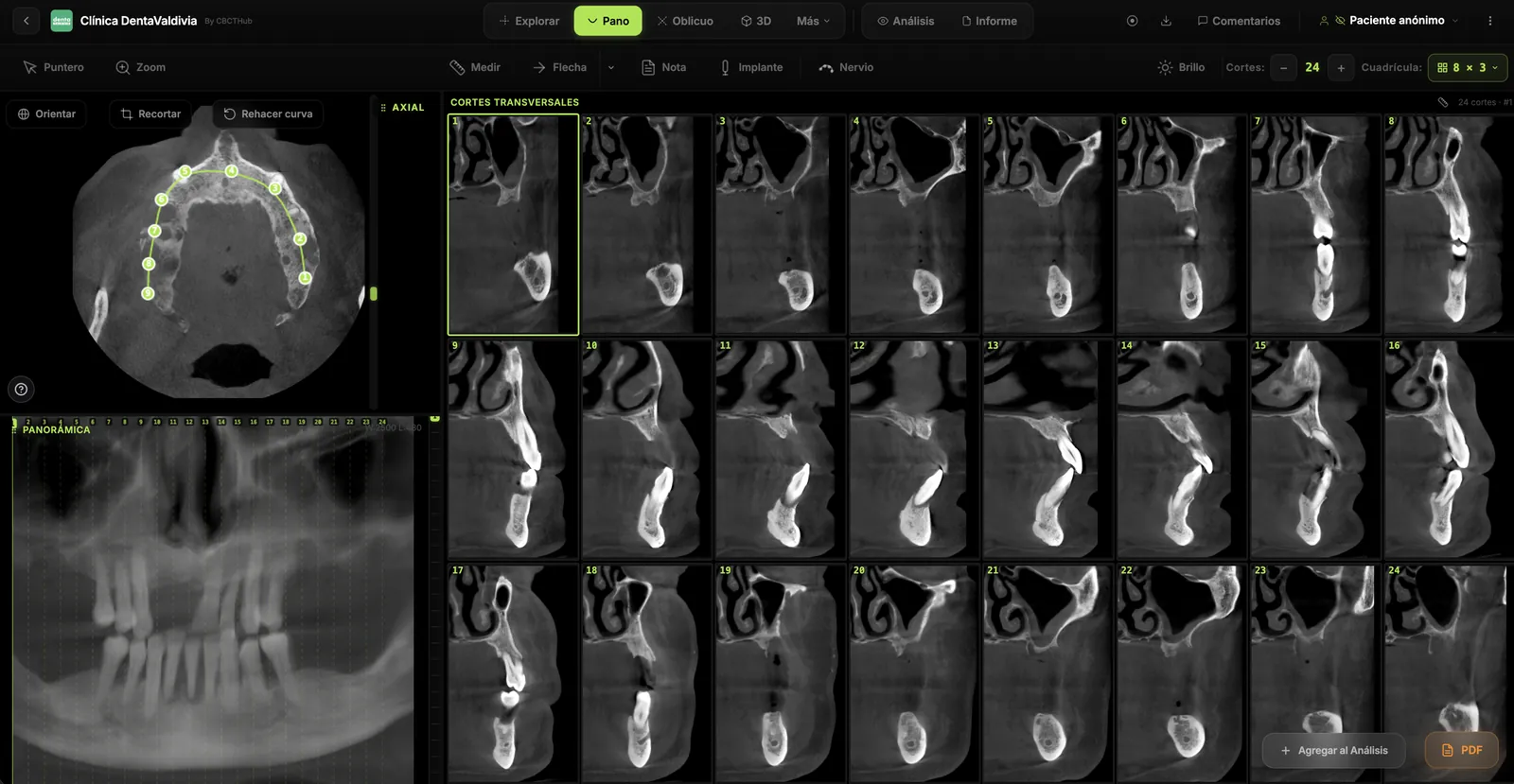
It is 5:40 p.m. on a Friday. A referral arrives: a 400 MB CBCT on a CD that “only opens on the back-office PC,” or a ZIP the email server bounced. The practical question is not “do we have cloud?” but where the study lives, who can open it, and how you hand it to the specialist without spraying health data.
This article is a clinic-day workflow guide for dentists and specialists: storage + access + sharing of CBCT. It is not a cloud-versus-on-prem PACS comparison, not a phased migration playbook, and not a compliance deep dive. Companion cluster pieces cover what an online CBCT viewer is, how to open a study without installing the manufacturer’s software, and when a browser beats a desktop. The angle here is different: what to keep, for how long, how to share, and which minimum controls matter.
“Cloud” for CBCT is not just a backup folder
In practice, “move CBCT to the cloud” usually mixes three layers:
- Storage. The dataset sits in a managed repository (with encryption and redundancy), not only on the reception PC’s disk.
- Access. The same study opens from the chairside, the planning box, or the specialist’s home — with an account or an authorized link.
- Sharing. The referrer, surgeon, or lab gets controlled access, not necessarily a physical copy or an unrecoverable attachment.
A Drive/Dropbox folder of ZIPs with no expiry policy and no audit trail may be “cloud” in marketing language. It is not automatically an acceptable clinical flow for identified images. You feel the difference when someone asks for “patient X’s CBCT from three years ago,” or when a link circulated in a WhatsApp group.
What to store: original DICOM versus proprietary projects
Farman argued that DICOM interoperability protects the clinical asset from brand silos. Day-to-day:
| What you keep | What it is for | Risk if it is the only copy |
|---|---|---|
| DICOM series / DICOMDIR | Reopen in another viewer, second opinion, audit | Low if the export is complete and lossless |
| Report / annotated captures (PDF, PNG) | Fast communication | Do not replace the volume for new measurements |
| Manufacturer project files (.plan, guides, segmentations) | Advanced planning in that ecosystem | May not open outside that workstation |
| JPEG dumps from the CD “viewer” | Quick chat sharing | Resolution loss; weak clinical metadata |
Practical rule: the canonical archive is the original DICOM (or a lossless compatible export). Brand projects are valuable as a work layer; they must not be the only backup. The NEMA DICOM standard remains the format reference; if a center only hands you an installer plus opaque folders, demand an open export before you archive.
Dental CT accreditation standards (IAC) also state that practices need a system to record and archive images, measurements, and final reports, with lossless digital storage and retention aligned to applicable medical-record rules — without prescribing one global number of years for every country.
Retention and backup: practical expectations (not legal advice)
Legal retention periods for radiographs and dental records vary by jurisdiction (years from last treatment, special rules for minors, and so on). This text does not replace your board, insurer, or counsel. It does support a written, team-known clinical minimum:
- What you retain: DICOM volume + signed report (if any) + exam metadata (date, FOV/indication when available).
- Where: at least one managed repository path plus a backup strategy (not “only the CBCT PC”).
- How you test backup: once a quarter, restore an old study and open it in an independent viewer.
- Who deletes: nobody “cleans disk” without a checklist; share links may expire without deleting the master archive.
- What does not count as clinical backup: a WhatsApp thread, an uninventoried USB stick, a CD in a drawer with no index.
SEDENTEXCT and EADMFR basic principles address indication and dose justification; keeping the study you acquired is a separate layer: if you ordered the CBCT, the clinical record should be able to retrieve it for comparison or defense of care.
Sharing matrix: CD/USB, WhatsApp/email, secure link
| Channel | Perceived cost | Clinical friction | PHI risk / control | Usability |
|---|---|---|---|---|
| CD / USB | Low materials; high staff time | High (drivers, “won’t open,” mail) | Medium–high (lost media, no expiry) | Poor outside the “PC that works” |
| ZIP via email / WhatsApp | “Free” | Medium (size limits, heavy compression) | High (forwards, groups, no audit) | Fast for captures; fragile for volumes |
| Access-controlled link | Usually bundled in the service | Low if the recipient only needs to view/measure | Lower with account/PIN, expiry, and logs | High for referrals and second opinion |
No channel is magically “secure” or “insecure”: it depends on who receives it, how long access lives, and whether you can revoke it. Mass-sending ZIPs named Lastname_DOB_CBCT.zip remains a common anti-pattern.
For clinical reading of a shared volume, a browser viewer often cuts friction (no fight with the CD autorun). That does not make the link a signed report or a synchronous teleconsult — those are different layers.
Access control: who opens what, expiry, and basic audit
Ask three questions before you share:
- Who: a named referrer, clinic B’s team, or “anyone with the link”?
- What: the full volume, captures only, or the report? The HIPAA Privacy Rule minimum necessary standard asks covered entities to limit uses and disclosures to what is reasonably needed for the purpose. There are exceptions (e.g., treatment disclosures between providers), but “dump the whole disk into a group chat” usually points the wrong way.
- Until when: link expiry, revocation, and whether you can see who opened it.
In the EU, GDPR (Regulation 2016/679) states data minimisation: adequate, relevant, and limited to what is necessary. Across LATAM, local personal-data and clinical-record laws often point in the same conceptual direction even when the statute wording differs. Operational translation for the clinic:
- Named accounts (not a shared “front desk” login).
- Links that expire by default (days, not forever).
- Avoid PHI in email subjects or public ZIP filenames.
- Separate the master archive (long retention) from temporary access (sharing).
- Ask the vendor for TLS in transit, access control, and — when applicable — access logs / a DPA.
AAOMR states that whoever obtains the CBCT is responsible for interpreting the volume (or referring to oral and maxillofacial radiology). A smoother cloud flow does not shrink that duty; it shrinks the excuse “we lost the CD.”
Cloud storage ≠ a full PACS
A cloud repository with viewing and sharing solves many clinic days. A PACS adds institutional workflow layers: worklist/HIS integration, long-term archive policy, multi-site routing, often HL7/DICOM networking, and user governance at scale.
Do not confuse:
- Clinical store + share → “I keep the DICOM, open it, and pass controlled access to the specialist.”
- PACS / migration / cloud vs on‑prem → infrastructure decisions covered in separate blog pieces on dental PACS in the cloud versus a local server, and on migrating the archive.
Also do not confuse “the study is online” with “we already evaluated an online CBCT viewer”: the DICOM software checklist and the browser-versus-desktop matrix help you choose the reading layer, which complements the store.
One-page checklist: evaluate a CBCT cloud store+share workflow
- Is the canonical export open DICOM (not only the brand project)?
- Can you open a 12–24‑month‑old study in a viewer other than the scanner’s?
- Are there two recovery paths (repository + tested backup), not just one PC?
- Who authorizes deletions and retention changes?
- Does the recipient need to install anything, or is a link/account enough?
- Does the link expire, and can you revoke it?
- Is there a trail of who opened the study (at least account-level or vendor logs)?
- Does the team know what not to send on WhatsApp (identified volumes)?
- Did you separate communication captures from the master archive?
- Did you test the full path with a real 300–500 MB ZIP on the clinic network (not the vendor demo)?
If 1–3 fail, prioritize interoperability and backup before “more cloud.” If 5–8 fail, prioritize access control before faster sending.
What this article is not
It does not compare vendors by name, invent product features, replace SEDENTEXCT on indication/dose, provide legal retention advice, or serve as a full HIPAA/GDPR checklist. It is not a PACS migration guide or a perimeter-security deep dive. Evaluate the store–open–share flow with evidence from your own clinic.
Related cluster reading (without repeating those angles): what an online CBCT viewer is, opening CBCT without installing, and browser vs desktop.
References
- Horner K, Islam M, Flygare L, Tsiklakis K, Whaites E. Basic principles for use of dental cone beam computed tomography: consensus guidelines of the European Academy of Dental and Maxillofacial Radiology. Dentomaxillofac Radiol. 2009;38(4):187-195. doi: 10.1259/dmfr/74941012
- European Commission. Radiation Protection No 172. Cone Beam CT for Dental and Maxillofacial Radiology: Evidence-Based Guidelines (SEDENTEXCT). Luxembourg: Publications Office of the EU; 2012.
- Carter L, Farman AG, Geist J, et al. American Academy of Oral and Maxillofacial Radiology executive opinion statement on performing and interpreting diagnostic cone beam computed tomography. Oral Surg Oral Med Oral Pathol Oral Radiol Endod. 2008;106(4):561-562. doi: 10.1016/j.tripleo.2008.07.007
- Farman AG. Raising standards: Digital interoperability and DICOM. Oral Surg Oral Med Oral Pathol Oral Radiol Endod. 2005;99(5):525-526. doi: 10.1016/j.tripleo.2005.03.001
- Farman AG. Applying DICOM to dentistry. J Digit Imaging. 2005;18(1):23-27. doi: 10.1007/s10278-004-1029-z
- National Electrical Manufacturers Association (NEMA). DICOM Standard (current edition). https://dicom.nema.org/medical/dicom/current/
- Intersocietal Accreditation Commission (IAC). Standards and Guidelines for Dental CT Accreditation. Published April 2025. https://intersocietal.org/wp-content/uploads/2025/04/IACDentalCTStandards2025.pdf
- U.S. Department of Health & Human Services. Minimum Necessary Requirement (HIPAA Privacy Rule). https://www.hhs.gov/hipaa/for-professionals/privacy/guidance/minimum-necessary-requirement/index.html
- Regulation (EU) 2016/679 of the European Parliament and of the Council (General Data Protection Regulation), Article 5(1)(c) (data minimisation). https://eur-lex.europa.eu/eli/reg/2016/679/oj
Try CBCTHub for free
Upload, view, and share DICOM scans in the cloud. Nothing to install.
Create free accountRelated articles
Browser DICOM viewer vs desktop: what works for CBCT in clinic
Open CBCT in the browser or install a desktop viewer? A clinical decision matrix: MPR performance, offline use, Mac/Windows mix, sharing without CDs, and when native software still wins.
How to open a CBCT without installing software: a practical online-viewer guide
You got a CD, ZIP, or link with a CBCT and no manufacturer viewer. How to open the DICOM in the browser, measure in mm, and what to do when it fails.
Dental DICOM software: a checklist for choosing a CBCT viewer
Before adopting a dental DICOM or CBCT viewer in the clinic: checklist for interoperability, MPR, mm measurements, share without CD, privacy, and TCO.