Browser DICOM viewer vs desktop: what works for CBCT in clinic
When a CBCT lands in the practice, the question is no longer only “Do I have a viewer?” but where you open it: in the browser or in software installed on a PC. Both can be clinical. A bad choice shows up at 6 p.m. on a Friday, with the patient in the chair and a multi‑hundred‑megabyte ZIP waiting.
This article is a decision matrix for dentists and specialists. It is not a PACS buying guide, it does not replace ALARA justification for CBCT, and it does not invent product features. Companion pieces in this cluster cover what an online CBCT viewer is, how to open a study without the manufacturer’s installer, and a checklist for choosing DICOM software. The angle here is different: browser versus desktop for day‑to‑day dental volumes.
What “browser viewer” and “desktop viewer” mean
A desktop DICOM viewer is a native app (Windows, macOS, or Linux) that you install, update, and run on a specific workstation. It talks to that machine’s GPU and file system; it often accepts DICOMDIR, loose folders, and manufacturer discs.
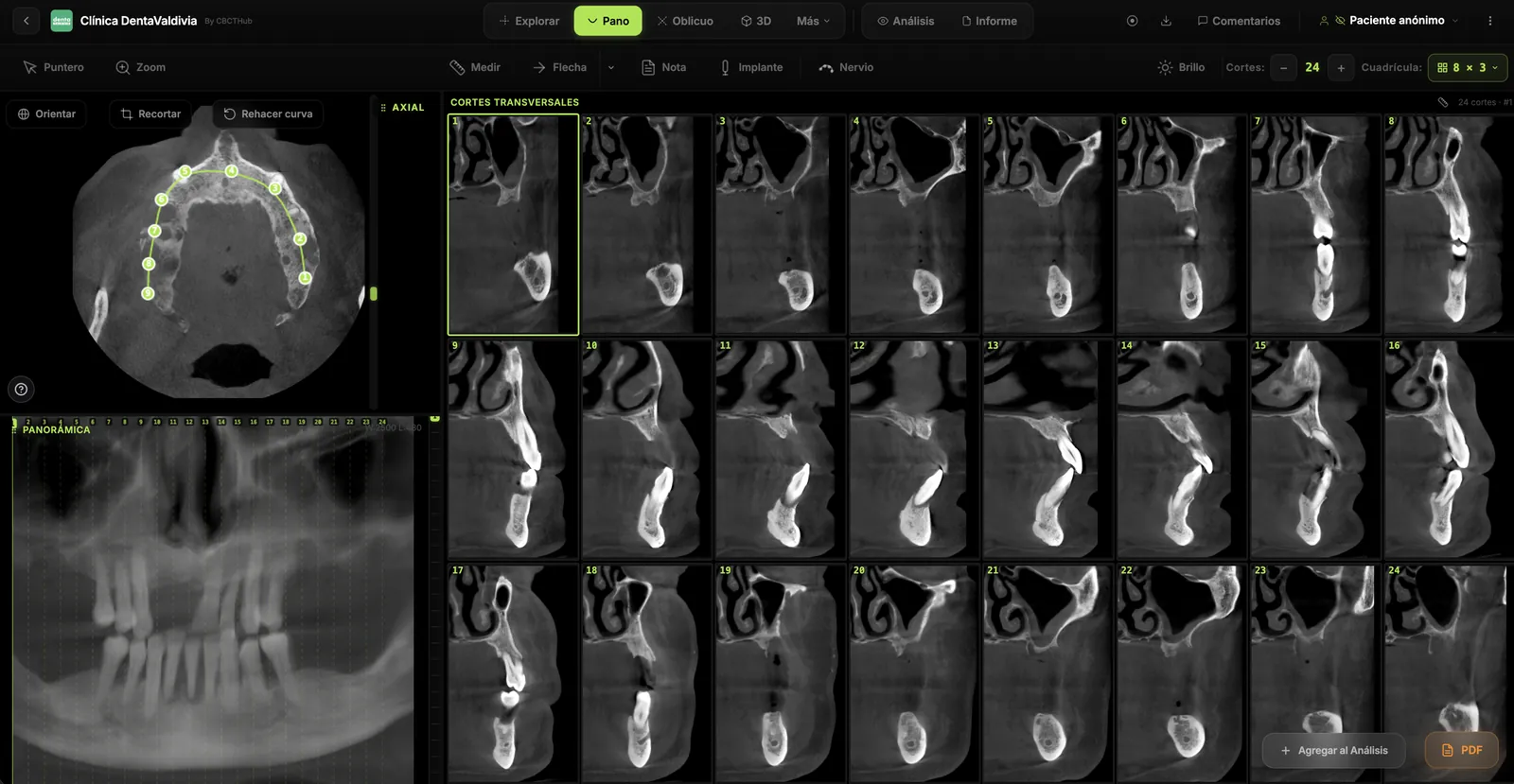
A browser DICOM viewer runs inside Chrome, Edge, Firefox, or Safari. The volume arrives via link, upload, or network; decoding, MPR, and measurements increasingly run on the client with WebAssembly, WebGL, and—evolving—WebGPU. It does not automatically replace a full PACS: it is the clinical reading layer for the dataset.
DICOM remains the NEMA standard for medical imaging. Farman argued that interoperability protects clinical data against vendor silos: the container (browser or .exe) matters less than whether the file is open DICOM.
Arguments that no longer hold
Common myths:
- “The browser cannot do real MPR.” Outdated for most daily 2D/MPR workflows. Recent work on progressive web apps for DICOM/MPR visualization reports competitive load and reconstruction times versus prior web tools, with geometric reconstruction error below 0.05 mm in reported validation.
- “Desktop is always more secure.” Security depends on encryption, access control, and policy—not on installing an .msi. A clinic PC with a vendor viewer and untracked discs is also risk.
- “Online means live teleconsult.” Sharing a link is not the same as synchronized teleconsultation or a signed report. Different layers.
When the browser usually wins
Prefer (or prioritize) a browser viewer when:
- Multiple seats and OSes. Windows operatory, Mac planning box, specialists tablet: one flow beats it only opens on the back-office PC.
- Outside referrals and foreign CDs. You need the center’s DICOM without installing that brand’s autorun (and fighting drivers).
- Sharing without 500 MB attachments. Controlled links (expiry, PIN, or account) beat WhatsApp ZIPs or bounced email.
- Updates without visiting every PC. Security patches and features land without “the person who knows how to install.”
- Quick review and second opinion. Open, measure in mm, capture, and return a judgment in minutes.
The AAOMR executive opinion states that the practitioner who obtains the CBCT is responsible for interpreting the volume (or referring to oral and maxillofacial radiology). A convenient viewer does not reduce that duty; it reduces the excuse “I could not open it.”
When desktop still wins
Keep (or prioritize) a native viewer when:
- True offline or unstable network. OR, rural sites, or saturated reception Wi‑Fi: a cloud‑only browser path fails without connectivity. Some hybrids cache locally—do not assume every product does.
- Advanced post‑processing or vendor ecosystem plugins. Guide planning, proprietary segmentation, TMJ/ortho modules tied to a brand workstation often live on the desktop.
- Dedicated hardware and calibrated monitors. An oral radiology station with a strong GPU, dual monitors, and peripherals usually gets more from native software.
- Very large volumes + heavy 3D rendering. Modern browser MPR scroll is clinically viable; the gap most often cited in technical literature remains intensive 3D volume rendering versus native workstations, even as WebGL/WebGPU narrows it.
- “Everything on the LAN, nothing leaves” policy. If compliance requires PHI never to touch an external processor, a local viewer (or controlled on‑premise deploy) may be required—legal advice aside.
Performance: measure in your clinic, not in the demo
Latency interrupts the appointment. Test with your files, not an 80 MB demo.
| Scenario | What to watch |
|---|---|
| Typical referral ZIP / folder | Time to first useful slice |
| Large FOV (ortho / TMJ) | Smoothness across hundreds of slices |
| Reception Wi‑Fi vs wired | Failures that only happen on busy days |
| Mixed Mac + Windows | Same millimetre measurements on both |
| Incomplete series or odd transfer syntax | Clear error vs blank screen |
WebAssembly brings parsing and decoding closer to native speed by running compiled code (e.g. from C++/Rust) in the browser. That is why “JavaScript is too slow for CT” is outdated for much 2D/MPR work. Still: benchmark your worst real case.
Privacy and compliance (shared layer)
Dental images are health data. In the US, HIPAA applies; in the EU/LATAM, GDPR and local laws. Ask the vendor (or your IT) for:
- Encryption in transit (HTTPS/TLS) for remote load or viewing.
- Control over who opens the study and, where applicable, access logs.
- Retention policy and link expiry / deletion.
- Contract or DPA when a third party processes data on your behalf.
A “free public viewer with no account” may suit an anonymized teaching case. It is not automatically fit for production with identifiers.
Hybrid model (what many clinics actually do)
It is not binary. A common pattern:
- Browser for referrals, sharing with the referrer, chairside or home review.
- Desktop for deep planning on a fixed station, brand modules, or scheduled offline work.
The companion DICOM software checklist helps you score both with the same criteria: Conformance Statement, MPR, millimetre measurements, open export, TCO.
One-page decision checklist
- How many seats and distinct OSes need to see CBCT this week?
- What share of studies arrive from other brands / CDs with installers?
- Do you need guaranteed offline on any box?
- Is the bottleneck open/measure/share—or brand post‑processing?
- Who maintains updates and backups on the “PC that actually opens files”?
- Did you test a real 300–500 MB ZIP on the clinic’s real network?
- Is export still standard DICOM (Farman / interoperability)?
- Who interprets the full volume (AAOMR) and with which tool do they review it end to end?
If 1–2 and 6 weigh more, the browser usually wins adoption. If 3–4 weigh more, keep desktop (or hybrid).
What this article is not
It does not rank brands by name, replace SEDENTEXCT / EADMFR principles on indication and dose, or promise features of any product. Judge with evidence in your workflow.
References
- Horner K, Islam M, Flygare L, Tsiklakis K, Whaites E. Basic principles for use of dental cone beam computed tomography: consensus guidelines of the European Academy of Dental and Maxillofacial Radiology. Dentomaxillofac Radiol. 2009;38(4):187-195. doi: 10.1259/dmfr/74941012
- European Commission. Radiation Protection No 172. Cone Beam CT for Dental and Maxillofacial Radiology: Evidence-Based Guidelines (SEDENTEXCT). Luxembourg: Publications Office of the EU; 2012.
- Carter L, Farman AG, Geist J, et al. American Academy of Oral and Maxillofacial Radiology executive opinion statement on performing and interpreting diagnostic cone beam computed tomography. Oral Surg Oral Med Oral Pathol Oral Radiol Endod. 2008;106(4):561-562. doi: 10.1016/j.tripleo.2008.07.007
- Farman AG. Raising standards: Digital interoperability and DICOM. Oral Surg Oral Med Oral Pathol Oral Radiol Endod. 2005;99(5):525-526. doi: 10.1016/j.tripleo.2005.03.001
- Farman AG. Applying DICOM to dentistry. J Digit Imaging. 2005;18(1):23-27. doi: 10.1007/s10278-004-1029-z
- National Electrical Manufacturers Association (NEMA). DICOM Standard (current edition). https://dicom.nema.org/medical/dicom/current/
- AboArab MA, Potsika VT, Theodorou A, et al. Advancing Progressive Web Applications to Leverage Medical Imaging for Visualization of DICOM and Multiplanar Reconstruction: Software Development and Validation Study. JMIR Med Inform. 2024;12:e63834. doi: 10.2196/63834
- U.S. Department of Health & Human Services. Minimum Necessary Requirement (HIPAA Privacy Rule). https://www.hhs.gov/hipaa/for-professionals/privacy/guidance/minimum-necessary-requirement/index.html
Try CBCTHub for free
Upload, view, and share DICOM scans in the cloud. Nothing to install.
Create free accountRelated articles
How to open a CBCT without installing software: a practical online-viewer guide
You got a CD, ZIP, or link with a CBCT and no manufacturer viewer. How to open the DICOM in the browser, measure in mm, and what to do when it fails.
Dental CBCT in the cloud: day-to-day storage and sharing in clinic
What “CBCT in the cloud” means in clinic: store the original DICOM, access it from multiple chairs, and share with access control — without mistaking it for a full PACS or a WhatsApp ZIP.
Dental DICOM software: a checklist for choosing a CBCT viewer
Before adopting a dental DICOM or CBCT viewer in the clinic: checklist for interoperability, MPR, mm measurements, share without CD, privacy, and TCO.