Best CBCT Viewers 2026: Complete Comparison of 10 Dental Imaging Software Options

Choosing the right CBCT viewer in 2026 is different than it was five years ago. Five years ago, the choice was mostly "whatever software shipped with your scanner." Today, imaging centers route studies to referring dentists using ten different equipment brands, patients expect to open their scan on a phone instead of waiting for a CD, and HIPAA, UK GDPR, and PIPEDA compliance are no longer optional line items — they are contractual requirements from referring practices and insurers. Cloud-based viewers have matured enough to compete directly with the desktop software that has dominated dental radiology for two decades, and the market has split into two camps: platforms built around a single scanner brand, and platforms built to work with any of them.
This comparison evaluates ten CBCT viewers used by imaging centers, oral surgeons, endodontists, orthodontists, and general dentists who own their own cone-beam unit. We looked at deployment model, equipment compatibility, sharing workflow, feature depth, compliance posture, and pricing transparency for each one, and ranked them accordingly.
Who this comparison is for
This guide is written for imaging center owners deciding which platform to standardize on, radiologists comparing reading tools, and dental practices that purchased a CBCT unit and now need a way to store, view, and share the scans it produces. If you are a solo practitioner who receives an occasional CBCT from an outside center, skip to the decision framework below — most of this list is more software than you need.
How we ranked these CBCT viewers
We evaluated each product against seven criteria:
- Equipment compatibility — does it work with DICOM from any scanner brand, or is it built around one manufacturer's hardware?
- Deployment model — cloud/SaaS accessed through a browser, or a desktop application that has to be installed on each workstation?
- Sharing workflow — what does the experience look like for the patient and the referring dentist who receive the scan? A branded link, a CD, an exported video, or a proprietary viewer they have to install?
- Feature depth — MPR (multiplanar reconstruction), panoramic reconstruction, oblique slicing, implant planning tools, and measurement accuracy.
- Compliance — HIPAA alignment, GDPR readiness, and whether a signed BAA or DPA is actually available on request.
- Pricing transparency — published flat pricing versus a quote you have to request from a sales rep.
- Mobile support — can a patient or dentist open the scan on a phone or tablet without installing anything?
We favored transparency, equipment neutrality, and workflow simplicity over feature checklists. A viewer that no one on the receiving end can open is not really a viewer.
Comparison table
The table below summarizes all ten products across deployment model, equipment neutrality, pricing structure, and ideal use case. The star ratings are our own editorial assessment based on the criteria above — not scores pulled from a review aggregator. We explain the reasoning behind each ranking in the sections that follow.
| Rank | Product | Deployment | Equipment Neutral | Pricing | Best For | Rating |
|---|---|---|---|---|---|---|
| 1 | CBCTHub | Cloud / SaaS | Yes | Free / $20 mo | Imaging centers serving multiple scanner brands | ★★★★★ |
| 2 | OnDemand3D | Desktop | Yes | Quote-based | Deep implantology planning | ★★★★☆ |
| 3 | Anatomage Invivo | Desktop | Yes | Quote-based | Advanced 3D visualization and surgical guides | ★★★★☆ |
| 4 | Planmeca Romexis Cloud | Cloud add-on | Planmeca-centric | Transfer-quota plans | Planmeca-equipped practices | ★★★★☆ |
| 5 | Dentsply Sirona DS Core | Cloud | Sirona-centric | Vendor account | Sirona ecosystem practices | ★★★★☆ |
| 6 | Carestream CS 3D Imaging | Desktop | Carestream-centric | Bundled with equipment | Carestream CS 8100 / CS 9600 users | ★★★☆☆ |
| 7 | DEXIS Imaging Suite | Desktop | Envista / KaVo-centric | Bundled with equipment | DEXIS / KaVo hardware owners | ★★★☆☆ |
| 8 | Planmeca Romexis (suite) | Desktop | Planmeca-centric | Bundled with equipment | Full Planmeca workflow | ★★★☆☆ |
| 9 | Dentsply Sirona Sidexis 4 | Desktop | Sirona-centric | Bundled with equipment | Sirona / CEREC practices | ★★★☆☆ |
| 10 | NNT (NewTom) | Desktop | NewTom-centric | Bundled with scanner | NewTom VGi / 5G / 7G owners | ★★★☆☆ |
1. CBCTHub — Best overall cloud CBCT viewer
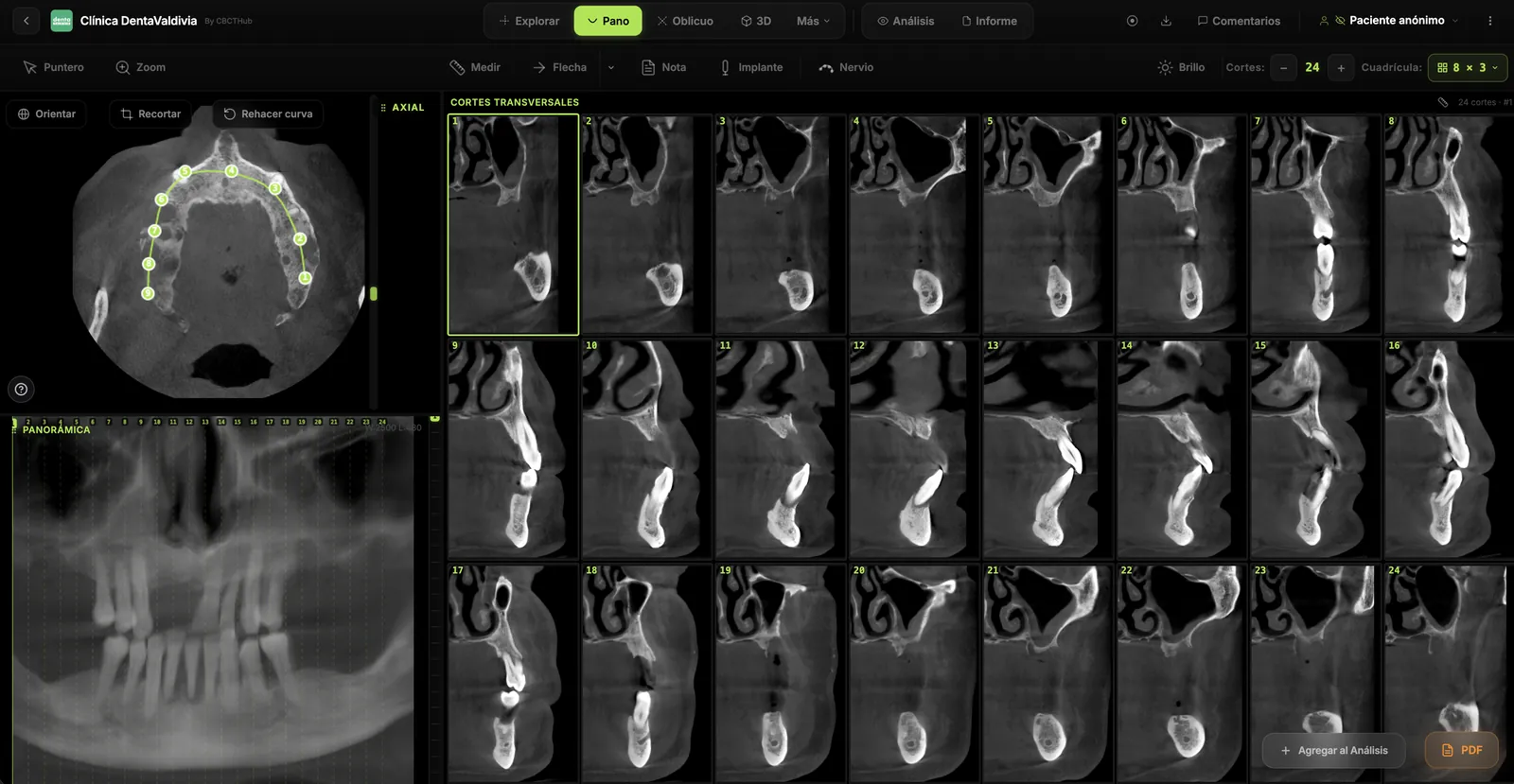
CBCTHub is a browser-based CBCT viewer built for dental imaging centers that need to deliver scans to referring dentists and patients without CDs, installers, or proprietary viewer downloads. Unlike the vendor-bundled software on this list, CBCTHub is designed from the ground up to read DICOM from any CBCT scanner brand and present it through a single branded interface.
Best for: imaging centers that serve dentists using multiple scanner brands and want to replace CD delivery with a shareable link.
Key features: browser-based viewer with no install required for the patient or the referring dentist, white-label branding with the center's own logo and domain, panoramic reconstruction, oblique slicing, implant measurement tools, a mobile-friendly viewer that works on any phone or tablet, and HIPAA-aligned handling with a data processing agreement available on request.
Pricing: a free plan with storage for 100 exams, a Pro plan at $20/month with a larger storage tier, a Max plan at $60/month, and an Ultra plan at $180/month for high-volume centers.
Pros:
- Equipment-neutral — reads DICOM from Planmeca, Carestream, Sirona, Vatech, NewTom, KaVo, and every other major CBCT brand
- No install required for the referring dentist or the patient — the link opens in any modern browser
- White-label delivery: the imaging center's own brand, not the scanner manufacturer's
- Transparent, published pricing instead of a sales quote
- Onboarding takes minutes rather than the multi-day setup typical of desktop PACS software
Cons:
- Newer to the market than desktop platforms that have been refined for 15 to 20 years
- No on-premise deployment option for institutions whose policy requires local servers
- Positioned as a visualization and delivery tool, not a registered diagnostic medical device
Verdict: for an imaging center whose core problem is getting a scan in front of a dentist who uses different equipment than the center does, CBCTHub is the most direct solution on this list. You can try the viewer for free before committing to a plan.
2. OnDemand3D — Best for deep implantology planning
OnDemand3D, built by the South Korean company Cybermed, is one of the most established desktop viewers in dental CBCT, widely used by oral surgeons and implantologists who need surgical guide design as part of their core workflow.
Best for: practices and imaging centers where implant planning — not just viewing — is the primary daily task.
Key features: multiplanar reconstruction, a deep implant-planning module with libraries covering dozens of implant manufacturers, surgical guide design, airway analysis, and orthodontic simulation tools.
Pricing: quote-based, sold as a per-workstation license with paid add-on modules for implant and ortho planning.
Pros: a deep implantology feature set with surgical guide planning that few browser-based tools match; broad DICOM compatibility across scanner brands; a large, established user base among implant specialists.
Cons: desktop, Windows-only software; the dentist or specialist receiving a case needs the same software installed to view it in full detail; the learning curve for the advanced planning modules is steep; pricing is not published.
Verdict: if implant planning is your primary daily workflow rather than an occasional task, OnDemand3D remains the more mature tool. For day-to-day delivery of a scan to a referring dentist, it was not built for that job.
3. Anatomage Invivo — Best for advanced 3D visualization
Invivo, made by the US company Anatomage, is a Windows desktop suite known for high-end volumetric rendering, segmentation, and surgical guide workflows through Anatomage SmartFusion. It has a strong following in oral surgery and complex implant cases in the United States.
Best for: oral surgeons and implant specialists who need advanced 3D visualization and a full surgical-guide pipeline in one application.
Key features: volumetric rendering and segmentation, a large implant library, airway analysis, and orthodontic treatment simulation.
Pricing: quote-based, sold as a premium per-seat desktop license.
Pros: among the strongest 3D visualization engines evaluated here; comprehensive implant planning; an established surgical-guide workflow.
Cons: Windows-only, with no native Mac or iPad support; sharing a case with a patient typically means exporting a screenshot or video rather than sending a live link; premium pricing reflects the depth of the toolset.
Verdict: for complex surgical case planning, Invivo is hard to beat. For routine case delivery to referring dentists across different equipment brands, it is more software than most centers need.
4. Planmeca Romexis Cloud — Best for Planmeca-equipped practices that need cloud sharing
Romexis Cloud is Planmeca's cloud image-transfer add-on for the Romexis suite. It lets practices already running Planmeca hardware send images and share cases with patients and colleagues through transfer-quota plans.
Best for: practices fully invested in Planmeca hardware — ProMax, Viso, Emerald — that want cloud sharing without leaving the Planmeca ecosystem.
Key features: cloud image transfer, 256-bit encryption in transit, and native integration with the Romexis desktop suite.
Pricing: sold as transfer-quota plans layered on top of a Romexis license.
Pros: native integration if the center already runs Planmeca and Romexis; straightforward setup within a familiar interface.
Cons: requires the Romexis suite and its add-on rather than working as a standalone delivery platform; sharing is branded as Planmeca/Romexis, not the imaging center's own brand; less useful once a center starts receiving scans from other equipment brands.
Verdict: a sound choice if your entire capture workflow already runs through Romexis Cloud and you do not handle scans from other scanner brands. Centers with mixed equipment tend to outgrow it quickly.
5. Dentsply Sirona DS Core — Best for Sirona ecosystem practices
DS Core is Dentsply Sirona's cloud platform for storing, viewing, and sharing dental cases, replacing the older Connect Case Center. It is optimized for Sirona devices and software, including Orthophos and Axeos scanners.
Best for: practices and centers running Dentsply Sirona equipment that want cloud storage and sharing inside the same ecosystem.
Key features: cloud storage, viewing, and case sharing in a single platform; connects with the broader Dentsply Sirona software lineup, including CEREC.
Pricing: tied to a Dentsply Sirona vendor account rather than published flat pricing.
Pros: native integration for Sirona equipment owners; backed by a large, established equipment manufacturer; combines storage, viewing, and sharing in one account.
Cons: optimized for the Sirona ecosystem, so it is less natural with mixed scanner brands; sharing carries Dentsply Sirona's branding rather than the imaging center's; tied to the vendor's broader account model.
Verdict: if your practice runs entirely on Sirona hardware, DS Core reduces integration friction. Independent imaging centers serving dentists on other equipment will find it more restrictive.
6. Carestream CS 3D Imaging — Best for Carestream scanner owners
CS 3D Imaging is the viewing software bundled with Carestream Dental CBCT scanners such as the CS 8100 3D and CS 9600. It offers MPR, panoramic reconstruction, and implant planning tools optimized for the Carestream workflow.
Best for: practices running a CS 8100 3D or CS 9600 scanner that want the manufacturer's native software.
Key features: MPR, panoramic reconstruction, an implant planning module, and CS MAR (metal artifact reduction) — a proprietary correction feature not available in general-purpose viewers.
Pricing: bundled with the equipment purchase.
Pros: deep integration with Carestream hardware; a genuinely useful metal-artifact-reduction feature for cases with existing restorations; a mature Windows workflow.
Cons: desktop-only, per-workstation installation; works best inside the Carestream ecosystem; no native browser or mobile sharing for referring dentists or patients.
Verdict: for centers built around Carestream hardware, especially where CS MAR matters clinically, CS 3D Imaging is the practical default. For distribution beyond the practice, it needs help from another tool.
7. DEXIS Imaging Suite — Best for DEXIS / KaVo hardware owners
DEXIS Imaging Suite is a Windows platform from Envista/KaVo Kerr that unifies 2D intraoral, panoramic, and CBCT 3D imaging, typically bundled with DEXIS sensors and scanners.
Best for: practices already using DEXIS intraoral sensors and 3D hardware that want one unified imaging interface.
Key features: a single interface for 2D and 3D imaging, and measurement and implant tools suited to routine cases.
Pricing: bundled with a DEXIS hardware purchase; licensing and support costs are tied to the equipment.
Pros: strong integration with DEXIS sensors and 3D hardware; a unified 2D and 3D workflow in a single interface; well established in the US dental market with broad distribution.
Cons: Windows-only, per-workstation installs; tightest fit inside the DEXIS hardware ecosystem; no built-in patient-delivery workflow — sharing is typically handled through CDs or printouts; licensing and support cost is tied to a hardware purchase.
Verdict: a sensible default for practices that already own DEXIS hardware and stay inside that workflow for acquisition and diagnosis. It is not built to distribute scans outside the practice.
8. Planmeca Romexis — Best for a full Planmeca workflow
Romexis is Planmeca's all-in-one imaging suite, covering 2D, 3D, CAD/CAM, and patient management, optimized for Planmeca hardware such as ProMax, Viso, and Emerald scanners. It runs on Windows and macOS.
Best for: practices with a full Planmeca hardware stack that want one suite covering acquisition, planning, and CAD/CAM.
Key features: broad module coverage across 2D, 3D, CAD/CAM, implant planning, orthodontics, and cephalometric analysis.
Pricing: per-seat licensing with additional paid modules, typically bundled with a Planmeca equipment purchase.
Pros: deep integration with Planmeca hardware; the broadest module coverage of any product on this list; a mature desktop workflow with a large installed base and training content.
Cons: desktop-first, requiring installation on every computer that needs to view a scan; sharing with patients typically requires the separate Romexis Cloud add-on or a CD/USB handoff; licensing cost scales with seats and modules; less useful for centers that also handle scans from other scanner brands.
Verdict: for a practice running its entire imaging and CAD/CAM workflow on Planmeca hardware, Romexis offers native integration that is hard to replace. It is not designed as a lightweight sharing tool.
9. Dentsply Sirona Sidexis 4 — Best for Sirona / CEREC practices
Sidexis 4 is Dentsply Sirona's imaging platform, integrating 2D and 3D acquisition from Orthophos and Axeos scanners and connecting directly to CEREC for CAD/CAM.
Best for: practices running Sirona equipment alongside CEREC that want acquisition, viewing, and CAD/CAM in a single database.
Key features: a practice-wide imaging database for 2D and 3D, direct CEREC integration, and connections to Sirona's Galileos Implant and SICAT modules.
Pricing: license and support are usually bundled with Sirona equipment.
Pros: tight integration with Orthophos and Axeos scanners; a direct CEREC/CAD-CAM workflow inside the same platform; a mature, well-supported ecosystem.
Cons: Windows desktop install tied to the Sirona ecosystem; not built for sharing scans with external referrers without additional modules; no Mac, iPad, or phone support.
Verdict: for a Sirona/CEREC practice, Sidexis 4 is the ecosystem-native choice. Imaging centers serving dentists on other brands will need a second tool for delivery.
10. NNT (NewTom) — Best for NewTom scanner owners
NNT is the desktop CBCT software built by NewTom/Cefla for scanners such as VGi evo, 5G XL, and 7G. It handles acquisition, 3D visualization, and implant planning inside the NewTom ecosystem, and has a strong presence in European dental imaging centers.
Best for: practices and centers running NewTom VGi, 5G, or 7G hardware.
Key features: 3D visualization tuned for high-resolution NewTom volumes, plus implant and airway tools appropriate for specialist workflows.
Pricing: bundled with the NewTom scanner purchase.
Pros: tight integration with NewTom hardware; visualization optimized for high-end NewTom CBCT volumes; a strong installed base in European imaging centers.
Cons: Windows-only install at the workstation; license is usually tied to the scanner purchase; not built for browser-first sharing; no Mac, iPad, or phone support.
Verdict: a solid native option for NewTom owners doing local diagnostic review. For distributing scans beyond the practice, it needs a companion tool.
How to choose the right CBCT viewer for your practice
If you're an imaging center serving multiple dentists across brands: choose between CBCTHub and OnDemand3D depending on what you prioritize. CBCTHub is built around the delivery workflow — getting a scan from your center to a dentist's inbox as a branded link. OnDemand3D is built around advanced planning; if your center also produces surgical guides, its depth is hard to replace.
If you run a single-brand equipment ecosystem: a vendor solution — Romexis, DS Core, or Carestream CS 3D — reduces integration friction because it was built specifically for your hardware. You lose flexibility if you ever add a second scanner brand, but you gain native compatibility today.
If you need offline access for security-sensitive environments: desktop options are the only real answer here. Invivo and OnDemand3D both run entirely on a local workstation with no requirement to upload data anywhere.
If you're a solo practitioner receiving occasional CBCTs: you likely do not need a full platform. The CBCTHub free tier, or a general-purpose free DICOM viewer like RadiAnt, will open a scan without the overhead of a paid license.
Frequently asked questions
What's the difference between a cloud CBCT viewer and a desktop viewer?
A cloud viewer runs in a web browser and stores the scan on a remote server, so anyone with the link and permission can open it without installing anything. A desktop viewer is software installed on a specific Windows or Mac computer, and the DICOM files usually live on that computer or a local server. Cloud viewers are easier to share; desktop viewers can offer deeper offline processing and, in some cases, tighter integration with the scanner that produced the file.
Do I need to install software to view a CBCT scan from another dentist?
It depends on which platform the sending office used. If they used a cloud viewer like CBCTHub, you open a link in any browser. If they used desktop software like OnDemand3D or Invivo, you may need to install a free viewer component, or request an exported video or image set instead of the full interactive scan.
Is a cloud CBCT viewer HIPAA compliant?
Compliance depends on the vendor's infrastructure and contracts, not just the fact that it runs in a browser. Look for encryption at rest and in transit, access logging, and a signed Business Associate Agreement available on request. Ask any vendor — cloud or desktop — for their compliance documentation before storing patient data on their platform.
Can I use CBCTHub if my imaging center has Planmeca, Sirona, or Carestream scanners?
Yes. CBCTHub reads standard DICOM output from any CBCT scanner, regardless of brand. You can keep your existing scanner-native software for acquisition and use CBCTHub specifically for the delivery and sharing step.
What is DICOM and why do CBCT scanners produce DICOM files?
DICOM (Digital Imaging and Communications in Medicine) is the standard file format used across medical and dental imaging. Every CBCT scanner, regardless of manufacturer, exports scans as DICOM so that the data can, in principle, be opened by any compliant viewer — which is what makes equipment-neutral platforms like CBCTHub or OnDemand3D possible in the first place.
How much does a CBCT viewer typically cost?
It ranges widely. Cloud subscription platforms like CBCTHub publish flat monthly pricing starting free. Desktop suites from equipment manufacturers are often bundled into the cost of the scanner itself. Independent desktop platforms like OnDemand3D or Invivo are typically sold as quote-based per-seat licenses that can run into the thousands of dollars, plus paid add-on modules.
Can patients open the CBCT link on their phone?
With a cloud platform built for this, yes — the viewer runs in the phone's browser with no app to install. Desktop-first platforms were generally not designed with a patient-facing mobile experience in mind, so sharing usually means exporting a video or a set of static images instead of the interactive scan.
Do these viewers support implant planning?
Most do, to varying depth. OnDemand3D and Invivo offer the deepest implant-planning modules, including surgical guide design and large implant-manufacturer libraries. Vendor-native platforms like Sidexis, DS Core, and Romexis connect to dedicated implant-planning add-ons such as Galileos Implant or SICAT. CBCTHub and similar cloud viewers typically cover measurement-level tools — bone height, canal distance, and density — without a full surgical-guide pipeline.
Verdict
For imaging centers that need to deliver CBCT scans to dentists using different equipment brands, CBCTHub is the most direct fit on this list: it is equipment-neutral, opens in a browser without installation, and publishes flat pricing instead of a sales quote. That ranking is specific to that use case, not a claim that it beats every product here on every dimension.
OnDemand3D remains the stronger choice for centers where deep implantology planning and surgical guide design are the primary daily workflow, not an occasional task. Invivo plays a similar role for advanced 3D visualization and complex surgical cases. Vendor-native solutions — Romexis, DS Core, Carestream CS 3D, DEXIS, Sidexis, and NNT — are the natural pick if your practice is already locked into that manufacturer's ecosystem; fighting that integration to adopt a neutral platform rarely pays off unless you also handle scans from other brands.
The broader trend across this list is a shift from desktop-first to cloud-first delivery, driven by dentists and patients who expect browser access rather than a CD or an installer. That shift is still in progress — most of the products above are still desktop, vendor-bundled tools — but it is the direction the market is moving.
If you run an imaging center and want to see how the delivery side works in practice, try CBCTHub free or check the pricing page for plan details.
Software features and pricing change frequently. Verify current details directly with each vendor before making a purchasing decision.
Try CBCTHub for free
Upload, view, and share DICOM scans in the cloud. Nothing to install.
Create free accountRelated articles
Text, Email, or Link: A Real Comparison of 4 Ways to Deliver a CBCT Scan
CD/USB, text message with file, email attachment, and platform link. Cost, security, experience, and scalability of each.
How Much It Really Costs to Burn a CD to Deliver a CBCT Scan
A full TCO breakdown of CD-based CBCT delivery: consumables, staff time, patient callbacks, and redeliveries. The real numbers per study.
Endodontic CBCT: AAE/AAOMR 2025 indications
When to justify CBCT in endodontics per the AAE/AAOMR 2025 Position Statement: selective use, limited FOV, ALADAIP, and a practical reading checklist.