Mobile app
CBCTHub in your pocket
Native iPhone and Android app. Review exams, dictate reports with your voice and share with one tap, from anywhere.
iOS 14+ · Android 8+ · Same plan as the web version
Pantalla principal de la app
Why have the app
Always with you
Review exams on the bus, at lunch, before a consult. No computer, no Cornerstone install, no DICOM converter.
Native performance
DICOM processing optimized for mobile. Smooth touches for measurements, MPR, panoramic and oblique slices.
Push notifications
Get notified when a new exam arrives for your patient or when a colleague comments on a consultation.
Same account
Sign in with Google or Apple. Your exams, templates and reports are synced with the web version.
What you can do
Native iPhone and Android app. Review exams, dictate reports with your voice and share with one tap, from anywhere.
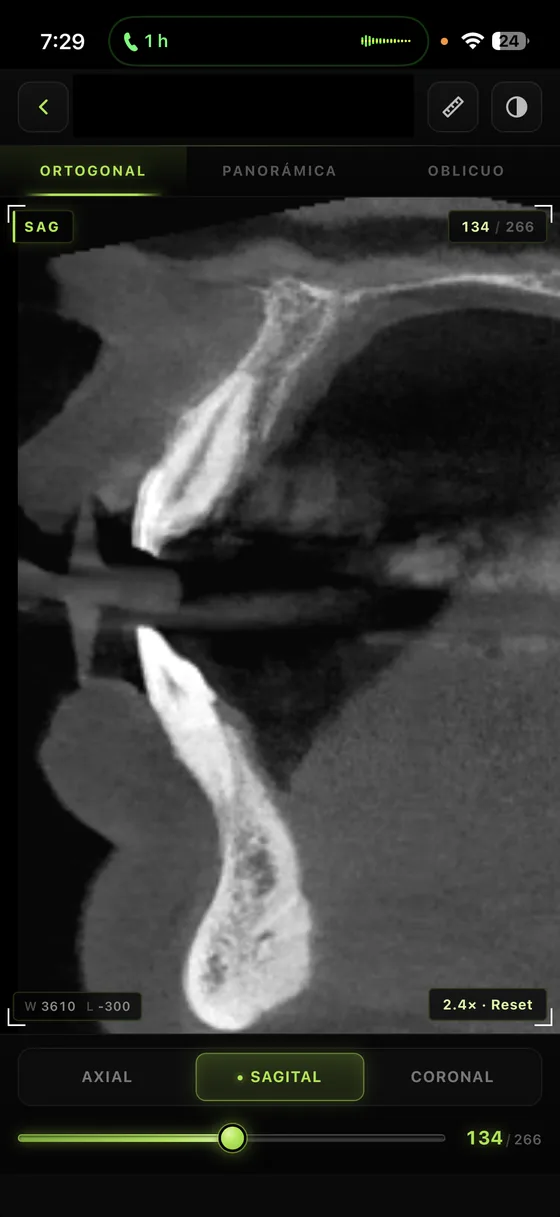
Full 3D viewer for CBCT
Axial, sagittal, coronal slices, reconstructed panoramic and oblique. Measurements, angles, annotations. All with touch gestures designed for the finger.

CBCT viewer on iPhone — slices and measurements
Voice dictation for reports
Dictate radiology reports with your voice. Whisper runs locally on the device (audio never leaves your phone) and applies a 100+ term dental glossary.

Voice dictation in the report editor
Share with one tap
Generate links for patients and referring dentists from the native iOS or Android share sheet. WhatsApp, email, message, copy link — everything your OS supports.

Native share sheet with WhatsApp/email
Login with Face ID and Touch ID
Biometric sign-in to open the app in seconds without typing a password, while maintaining clinical security.

Face ID login when opening the app
Upload exams from your phone
Receive a DICOM ZIP via WhatsApp or AirDrop, upload it to your CBCTHub account directly from the app, no computer needed.

Upload DICOM from your phone
Native dark mode
Design optimized for reviewing radiographic images in low-light conditions, faithful to the OS dark mode.

Dark mode in use
Screenshots
From your home screen to the 3D viewer

Exam list

Patient detail

Share with dentist

Notifications
Compatibility
iPhone and iPad
iOS 14 or later. Optimized for iPhone X onwards. Works on iPad with expanded view.
Android
Android 8 (Oreo) or later. Optimized for phones with 4GB+ RAM.
Download the app
Same account, same exams, same templates — synced.