The platform your imaging center
has been waiting for
Replace CDs with links. Patients get their CBCT via WhatsApp or email in minutes, and referring dentists view it instantly — no software required.
No credit card · Free plan available · Ready in 30 seconds
Works with every major CBCT brand
The problem
Sound familiar?
CDs nobody can open
Patients lose the disc, don't have a reader, and even if they find one, they have no idea what software to use. Neither does the referring dentist.
File transfers that go nowhere
Some centers send DICOMs via WeTransfer or Google Drive, but the recipient has no DICOM viewer. They get the files and can't do anything with them.
Expensive viewer software
Opening a CBCT requires desktop DICOM software that costs $500+/year per workstation. The referring dentist doesn't have it. The patient definitely doesn't.
No way to collaborate
The radiologist wants to walk the referring dentist through a finding, but the only option is emailing screenshots or screen-sharing over Zoom.
Comparison
Before vs. after CBCTHub
- ✕Burn a CD for every patient
- ✕Patient can't open the disc
- ✕Dentist needs $500+/year software
- ✕Email screenshots to discuss findings
- ✕No way to know if the patient picked up the exam
- ✕Patient loses the CD and asks for another
- ✓Send a link via WhatsApp or email
- ✓Patient opens the scan on their phone
- ✓Dentist views it instantly — no install
- ✓Present live with synced streaming
- ✓Dashboard tracks every exam's status
- ✓The scan is always available in the cloud
How it works
From scan to shared link in minutes
A simple workflow that removes friction at every step.
Patient gets their CBCT
Your team exports the DICOM as usual.
Technician uploads the file
Drag the DICOM folder or ZIP into the dashboard. Assign the patient.
Radiologist reports
Open the viewer from anywhere, interpret the scan, and attach the PDF report.
Automatic delivery
The patient gets the link via email or WhatsApp. So does the referring dentist.
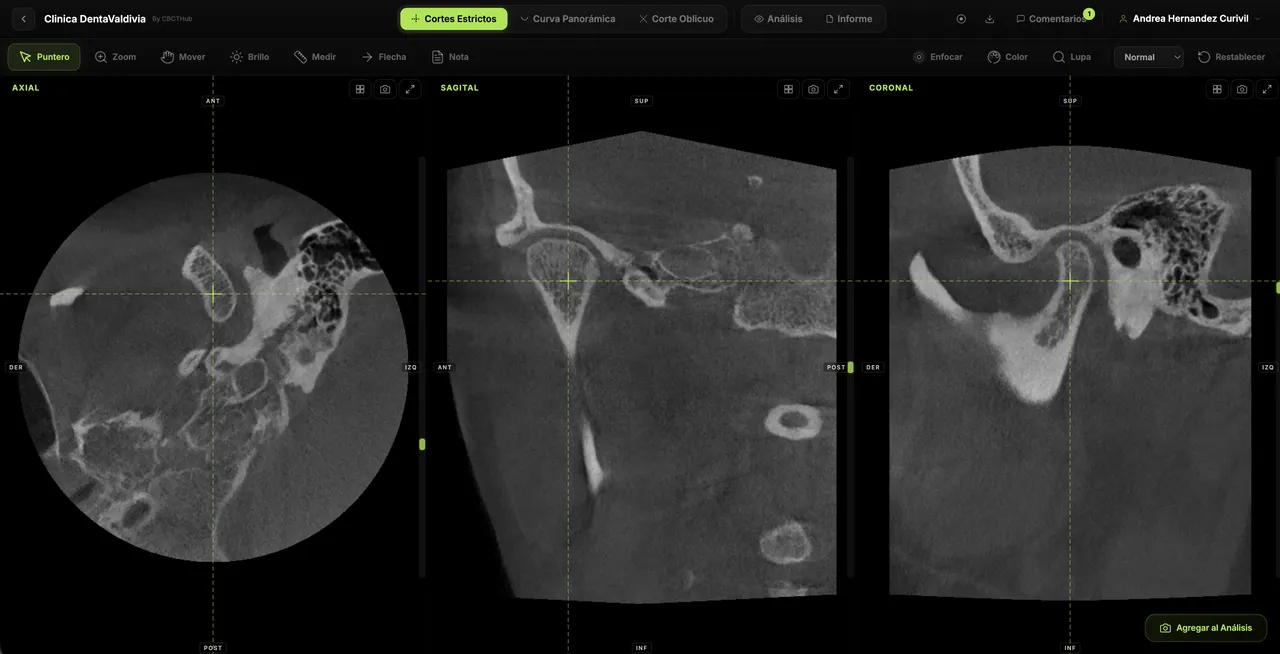
Patients and dentists only need a web browser to view the full exam — MPR slices, panoramic, oblique, and measurements.
No app to download. No account to create. Nothing to install.
Patient experience
How your patient receives their scan
A link via WhatsApp or email. They open it on their phone or computer and see their full exam — with your logo and branding.
Gets a link
The patient receives a message with a link to their scan. Via WhatsApp, email, or however you prefer.
Opens in the browser
One tap and they're viewing their full CBCT in the browser. With your logo, your branding, and the radiologist's PDF report.
Shares with their dentist
The patient forwards the same link to their dentist, who opens it instantly to plan treatment.
Benefits
What your imaging center gains
Cut operational costs
Eliminate CDs, reduce staff time on burning and delivery. Studies are delivered automatically via a link.
Stand out from competitors
Be the imaging center that delivers exams via WhatsApp with your own branding. Referring dentists will notice — and prefer you.
Scale without friction
Handle more exams without more hardware. Everything runs in the browser, in the cloud, with local processing.
Centers already using CBCTHub
What our users say
We stopped burning CDs on day one. Patients love getting their scan via WhatsApp, and referring dentists are thrilled.
Dr. Martín R.
Director, Dental Imaging Center
Live streaming changed how I present findings. No more coordinating video calls or emailing screenshots.
Dr. Carolina V.
Oral Radiologist
The best part is the patient doesn't have to install anything. They click the link and see their full scan. That simple.
Dr. Felipe A.
Dentist, Implantology
Features
Everything your dental imaging center needs
Patient management
Organize exams by patient. Search by name, ID, or date. Full history at your fingertips.
Role-based teams
Add technicians, radiologists, and admins. Each with the permissions they need.
Your logo and branding
The viewer page displays your logo and colors. Every shared exam reinforces your brand.
Attached PDF reports
The radiologist attaches their report and the patient receives it alongside the viewer link.
Live streaming
Present scans in real time to the referring dentist. Slices, annotations, and cursor — all synced.
Threaded comments
Leave comments linked to a specific slice. Each comment generates a deep link to the finding.
Works with every scanner
Compatible with Carestream, Planmeca, Vatech, Sirona, Morita, NewTom, and any standard DICOM system.
100% local processing
Images are rendered in the user's browser. They never pass through our servers.
Pricing
Plans for imaging centers
Pick the plan that fits the size of your practice.
Pro
For small centers or independent radiologists
- ✓350 GB storage
- ✓Upload radiographs
- ✓All professional views
- ✓Your logo & branding
- ✓PDF reports
- ✓Live streaming
- ✓Threaded comments
- ✓Priority support
Max
For centers with a team
- ✓1.5 TB storage
- ✓5 users included
- ✓Everything in Pro
- ✓Patient management
- ✓Team collaboration
- ✓Dedicated support
No commitment · Cancel anytime
Need more users or storage? Contact us
Try it risk-free
Create a free account, upload your first scan, and share the link. No credit card, no contracts, no fine print. If it's not for you, just stop using it.
Free plan available forever · Upgrade anytime
FAQ
Common questions, answered
Are my DICOM files secure?+
Yes. All image processing happens in the user's browser. DICOM files never pass through our servers. Only the metadata needed to organize your studies is uploaded.
Does it work with my CBCT scanner?+
CBCTHub works with any scanner that exports standard DICOM files: Carestream, Planmeca, Vatech, Sirona, Morita, NewTom, Instrumentarium, PreXion, DENTSPLY, KaVo, and more.
Does the patient need to install anything?+
No. The patient receives a link and opens it directly in their browser (Chrome, Safari, Firefox, etc.). No app to install, no account to create, no software to download.
Can I put my logo on shared exams?+
Yes. On Pro and Max plans, you can customize the viewer page with your center's logo and colors. Every shared exam reinforces your brand.
How many exams can I upload?+
Pro and Max plans include unlimited exams. The free plan includes 3 exams so you can test the platform.
Can I attach the radiologist's report?+
Yes. You can upload a PDF report to each exam. When you share the study, the recipient can view and download the report alongside the images.
How does CBCTHub compare to traditional DICOM software?+
Traditional DICOM software requires installation, expensive licenses ($500+/year per workstation), and only works on the computer where it's installed. CBCTHub works from any browser, with no installation, and lets you share exams with a link.
What if I want to cancel?+
No commitment. Cancel your subscription anytime from your dashboard. No penalties, no long-term contracts.
Your next patient could get their scan
via WhatsApp
Create your account, upload your first CBCT, and send the link — all in under a minute. No credit card required.
Works with Carestream, Planmeca, Vatech, Sirona, and more · Free plan available